Does Web Hosting Affect SEO? What SEO-Friendly Hosting Means
Yes, web hosting affects SEO, but only through a few mechanisms, and none of them is a secret ranking boost a host can sell you. A slow server delays your pages and drags on Core Web Vitals, which Google's ranking systems use. A server that returns errors makes Googlebot crawl less, and persistent errors can drop pages from the index. HTTPS has been a lightweight signal since 2014. Beyond that, "SEO-friendly hosting" is mostly marketing.
There is a second meaning of the phrase that is worth knowing so you can avoid it. Some providers sell "SEO hosting": accounts spread across many different IP ranges so that a group of sites looks unrelated. That product exists to hide link networks, the practice Google's spam policies describe as links created to manipulate rankings. This guide separates the two, cites what Google's own documentation says (read 9 Oct 2026), and ends with a checklist for picking a host that will not hold your rankings back.
Does web hosting affect SEO? Three ways it does
Google does not rank sites by host. It ranks pages, and the host influences how those pages perform in three measurable ways.
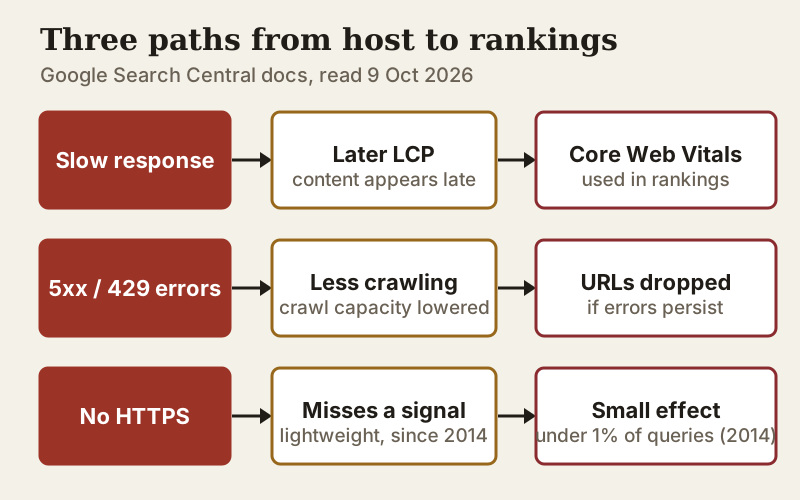
- Speed: server response time is the first step of every page load, so a slow server delays the moment your main content appears.
- Availability: when a server returns errors or times out, Googlebot slows its crawling, and pages that keep failing can eventually be removed from the index.
- Security: HTTPS is a confirmed, if light, signal, and a host that makes certificates free and automatic removes any excuse not to use it.
Everything else a host advertises, from "SEO tools" in the control panel to "SEO-optimised servers", either sits on top of these three or has nothing to do with rankings.
Server response time and Core Web Vitals: what Google documents
Google's documentation says Core Web Vitals are used by its core ranking systems, with "good" thresholds of 2.5 seconds for Largest Contentful Paint, under 200 milliseconds for Interaction to Next Paint and under 0.1 for Cumulative Layout Shift. The same documentation is careful about weight: Google states that there is no single page-experience signal and that its ranking systems look at a variety of signals. Excellent vitals will not lift weak content, but poor ones can hold back a page that competes closely with others.
Hosting touches Largest Contentful Paint most directly. Before the browser can draw anything, the server has to answer, so a slow response pushes every later step back. Pages are not getting lighter either: by the HTTP Archive's 2025 count, a typical mobile home page now weighs 2.56 MB, 8.4% more than a year earlier. A content delivery network (CDN) helps by serving images, scripts and often whole pages from locations near the visitor.
What hosting cannot fix is a heavy page. If your page builder ships several megabytes of scripts, a faster server only shaves the first fraction of a second. Check your vitals in Search Console's Core Web Vitals report before blaming the host.
Downtime, 5xx errors and crawling
This is where hosting has its clearest documented effect. Google's guidance on HTTP and network errors says that 5xx and 429 responses make its crawlers slow down, that crawling speeds back up gradually once pages return normal 2xx responses, and that URLs already in the index are kept for a while but eventually dropped if the errors persist. Its crawl budget documentation adds that slower responses, 5xx errors and 429s all lower the crawl capacity limit Google sets for a site.
In practice, a short outage is not an SEO event. A host that throws server errors every day under ordinary load is. The pattern to watch for is in Search Console's Crawl Stats report: a rising share of server errors, or a host-status warning, means your server is turning Googlebot away.
That is also why the uptime terms matter more than the uptime marketing. Bluehost's terms promise 99.99% on shared hosting and DreamHost's 100%, each with a capped service credit; HostGator's terms offer neither an uptime guarantee nor any credit (terms read 9 Oct 2026). A credit will not restore lost crawling, but a host that commits to a number in its contract tends to measure itself against it. Our explainer on uptime guarantees covers how those credits work.
Server location: a smaller factor than you think
Many hosts still sell server location as an SEO feature. Google's documentation on multi-regional sites says server location can be a signal about a site's intended audience but is not definitive, partly because CDNs serve content from many places at once. It calls a country-code domain such as .de or .co.uk a strong signal, and lists others it uses, including hreflang annotations, local addresses and currency.
One older piece of advice is now out of date. Search Console's International Targeting report, which let site owners set a target country, has been deprecated; hreflang is still supported. Any guide telling you to set a country in Search Console was written before that change.
So choose a data centre near your visitors for speed, not for rankings. If your audience is spread across continents, a CDN will do more for the people far from your server than any choice of location.
"SEO hosting" with multiple IP ranges: what it is and why to avoid it
Search for "SEO hosting" and you will find a different product: plans that put each of your sites on a different IP address, often in different "C-class" ranges, so that no two look connected. The pitch is that links between your own sites then look independent.
Google's spam policies do not mention IP classes or private blog networks by name, so we will not claim they do. What they do define is link spam: links created primarily to manipulate rankings, including buying or selling links, automated link creation and excessive link exchanges. Google's ranking systems guide names SpamBrain and a dedicated link-spam system among the tools it uses. A product whose purpose is to disguise a network of your own sites linking to each other is, in plain terms, infrastructure for exactly what that policy describes.
| Aspect | SEO-friendly hosting | "SEO hosting" (multi-IP) |
|---|---|---|
| What it is | Fast, reliable hosting with HTTPS and a CDN | Sites spread across many IP ranges to look unrelated |
| What it helps | Page speed, crawling, uptime | Disguising links between your own sites |
| Google's position | Core Web Vitals used by ranking systems; errors slow crawling | Links made to manipulate rankings are link spam |
| Who needs it | Every site | No legitimate site |
There is no legitimate SEO reason to spread ordinary sites across IP ranges. Shared hosting routinely puts many unrelated sites on one IP address, so sharing an address is normal rather than a footprint in itself. If a host's main selling point is IP diversity, look elsewhere.
A checklist for picking an SEO-safe host
Use the hosts' own terms and plan pages, not their marketing claims. For the mainstream shared hosts we track, the scorecard below records what each entry plan includes, read on 9 Oct 2026.
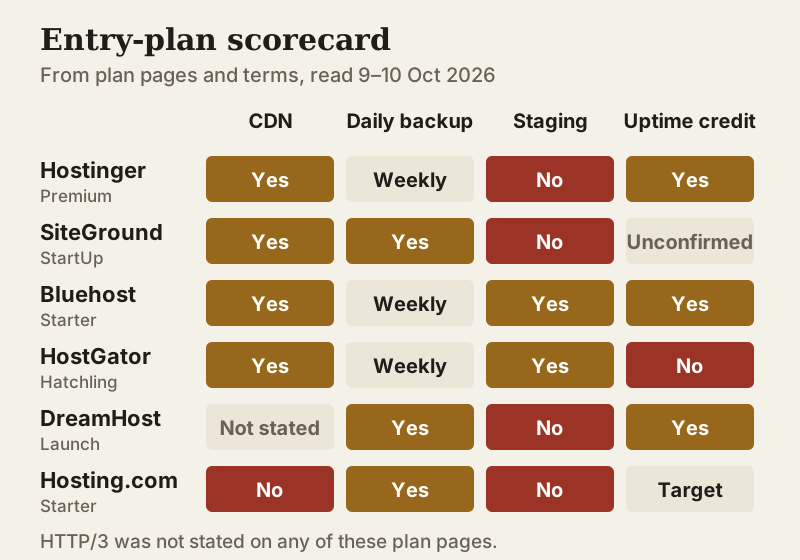
- Free, automatic HTTPS on every site, renewed without your involvement. DreamHost includes a free SSL certificate with its web hosting, and HostGator lists auto-renewed SSL on its shared plans (pages read 10 Oct 2026); watch for exceptions such as GoDaddy's Economy plan, whose certificate is listed as free for year one only.
- A CDN on the plan you will actually buy. Hostinger lists a CDN on Premium, SiteGround on every plan including StartUp, and Bluehost and HostGator include one on entry plans; Hosting.com's comparison lists a CDN as not included on its shared plans.
- Uptime written into the terms with a remedy, not only on the sales page.
- Daily backups and a staging site, so a broken update never stays live long enough to be crawled. SiteGround includes daily backups on all plans but staging only from GrowBig; Hostinger's Premium plan has weekly backups and no staging.
- Room to grow without migrating: a host whose next tier adds resources rather than only more websites.
If you want a CDN, daily backups and published renewal pricing on one entry plan, SiteGround fits, though StartUp jumps from $2.99 in year one to $17.99 monthly afterwards (prices read 9 Oct 2026). On a tighter budget, Hostinger Premium bundles a CDN at $2.99 monthly when you prepay four years, then $10.99, though its backups are weekly rather than daily. Either way, the host is the floor under your SEO, not the ceiling.
A free Cloudflare account in front of any host is a reasonable complement: its free plan includes unmetered DDoS protection, free DNS and a managed firewall ruleset. If you move DNS to it, follow the same care as any migration so email and verification records come across intact.
Edge cases
- Static sites: if your site is plain HTML or built by a static generator, almost any host or CDN will serve it quickly; hosting barely matters for SEO.
- Free hosting platforms: some restrict commercial use. Vercel's free Hobby plan, for example, is limited to non-commercial personal use, which excludes affiliate sites and businesses.
- Migrations: moving hosts is SEO-neutral if URLs stay the same and the new server answers properly. Our guide to switching hosts without downtime explains the order of steps.
- Shared IP blocklists: on shared hosting, a neighbour sending spam can hurt your email deliverability. That is an email problem rather than a search one, and a good reason to keep business mail on a dedicated provider.
For a ranked shortlist judged on renewal price, support and uptime terms, see our best web hosting rankings.
Hosting and SEO questions
Does web hosting affect SEO?
What is SEO hosting?
Does server location affect SEO?
What is the best web hosting for SEO?
Can a bad host hurt my rankings?
See how this fits the field: the best web hosting, ranked, or the side-by-side hosting comparison.