Web Hosting Migration: How to Transfer Hosts Without Downtime
Yes, you can transfer web hosting to a new company without losing your site, your email or your domain name, and without a minute of downtime. The method is to run both hosts side by side: build and test the copy on the new server while the old one keeps serving visitors, then repoint the domain and cancel the old plan only after the new one has carried real traffic. The domain itself never has to move, because it lives at your registrar, not your web host.
That overlap is cheap insurance, but the timing of the switch has a price that most migration guides never mention. Move halfway through a prepaid term and you pay twice; move in the weeks before your renewal and the new host's intro rate does the work. Below is the step-by-step, the free-migration terms each major host actually publishes, and the arithmetic on when to switch.
Can you switch hosts and keep your domain name?
Almost always, yes, and usually without touching the domain at all. A domain name and a hosting plan are two separate products, even when one company sold you both. The registrar holds the name; the host holds the files. Changing web hosting while keeping the domain means editing where the name points (its DNS records or nameservers), not transferring the registration.
The one case that needs extra planning is a domain you got free with your current hosting plan. It is still registered in your name, but it sits in the old host's account, so cancelling everything at once can take the domain with it. Either keep that account open until you have moved the registration to a registrar of your choice, or simply leave the domain where it is and only change its DNS. Registrars can refuse a transfer shortly after a registration or a previous transfer, so start that part early if you want it done.
The overlap method: run both hosts for a few days
Every safe migration follows the same rule: the old site stays live until the new one is proven. In practice that means signing up with the new host first, copying the site across, testing it privately, and only then changing DNS. Visitors keep reaching the old copy until their resolver picks up the new address, and from then on they reach the new copy. At no point is there a moment with nothing behind the domain.
The timeline below is the order we recommend. The day counts are a planning guide, not measured times; a small brochure site can be done in an afternoon, while a large store with a busy database needs a content freeze and more testing.
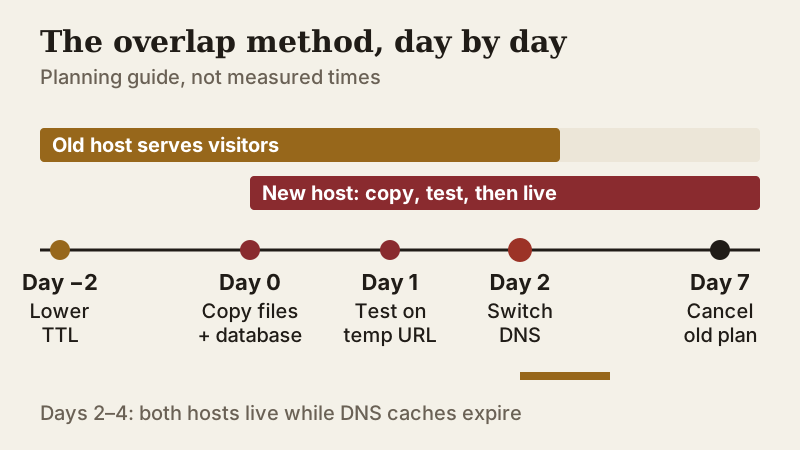
The overlap costs you nothing extra in most cases, because you are already paying for the old plan until its term ends. What it buys is a fallback: if anything breaks after the cut-over, you point DNS back and you are where you started.
Step by step: how to transfer web hosting from one company to another
- Take a full backup you control: download your site files and export every database to your own computer, not only to the old host's backup tool.
- List what the site depends on: PHP version, database engine, cron jobs, custom server settings, every DNS record (A, CNAME, MX, TXT including SPF and DKIM) and every mailbox.
- Lower the TTL on the records you will change, at least one full old-TTL period before the switch, so caches expire quickly when you flip them.
- Buy the new plan and copy the site: use the host's free migration service or plugin if it covers your setup, or upload files and import the database yourself.
- Check the copy privately, through the host's preview address or a hosts-file entry on your computer: logins, forms, checkout, search, image uploads and any scheduled jobs.
- Change the A record (or the nameservers) to the new host, and leave the old plan running.
- Watch both hosts for 48 to 72 hours, recreate mail and SSL on the new side, then cancel the old plan once traffic has fully moved.
Step 3 is the one people skip. TTL (time to live) tells resolvers how long they may cache a DNS answer. Defaults vary by DNS provider: Namecheap's BasicDNS uses 30 minutes for standard host records, and Cloudflare fixes proxied records at "Auto", which is 300 seconds, while DNS-only records can go as low as 60 seconds on non-Enterprise plans (documentation read 9 Oct 2026). Amazon's Route 53 documentation suggests the same habit we do: drop a live record to a short value such as 300 seconds before you change it, then raise it again afterwards.
Nameserver changes are slower than record edits, because the delegation is cached at the registry level and you cannot shorten it yourself. If you can, keep your current DNS provider and change only the A record; move nameservers later as a separate, unhurried job.
Free migration offers compared
Most hosts will move a site for you, and the free offers differ more than their banners suggest. Some move anything with a cPanel; others only move WordPress; one excludes email entirely. These are the terms each host publishes on its own pages, read on 9 Oct 2026.
| Host | What is free | Limits the host states | Not included |
|---|---|---|---|
| Hostinger | Migration requests on Web, Cloud and Agency plans | One request per site, up to 5 active at once; not on VPS | Email, DNS, cron jobs, custom SSL, FTP accounts, builder sites |
| SiteGround | Migrator plugin on every plan; expert manual move on eligible plans | Expert-move eligibility set by plan | Price of a paid move not published |
| Bluehost | Self-serve Site Migration Tool on all plans | Self-serve only | Paid professional move: no published price |
| DreamHost | Automatic migration plugin for WordPress | WordPress only | Non-WordPress sites go to paid Pro Services |
| Hosting.com (formerly A2) | Managed migration on shared plans | Site count not stated | Migration fees otherwise non-refundable |
| GreenGeeks | WordPress migration, sold as unlimited | Site count not defined | Non-WordPress terms not stated |
| Kinsta | Unlimited free migrations | Applies to its WordPress plans | Fine print beyond the pricing page not checked |
Two patterns stand out. First, WordPress sites are the easy case: almost every host has a free plugin or a free managed move for them, while a hand-built PHP site or a site-builder export often falls outside the free offer. Second, "free migration" rarely includes email, DNS or SSL. Hostinger's knowledge base is the most explicit, listing files and databases as covered and cron jobs, DNS, custom certificates and FTP accounts as yours to recreate, with mailboxes moved by hand.
If your site is WordPress and you want the move handled, SiteGround and Hostinger both publish clear free-migration terms; DreamHost covers WordPress with its plugin. For a non-WordPress site, ask for the migration scope in writing before you pay, because a refused job usually means doing it yourself.
What switching really costs: the timing math
The overlap is cheap. The timing is where switching gets expensive. Hosts sell their lowest prices as prepaid terms, and after the money-back window closes, unused months are usually gone: Bluehost, HostGator and Hostinger all state that refunds apply only to cancellations within 30 days of purchase, and Hostinger treats a renewal as a new transaction (terms read 9 Oct 2026). So the question is not "is the new host cheaper?" but "how much of my current term would I throw away?"
Here is a worked example. Say your current plan is prepaid for 12 more months and renews at $10.99 a month after that. The alternative is DreamHost Launch, priced at $2.89 monthly for year one (paid upfront as a 1-year term) with an auto-renewal at $10.99 (DreamHost pricing page, read 10 Oct 2026). Over the next 24 months, the new money you spend in each scenario is:
- Stay and renew: the prepaid year costs nothing new, then 12 months at $10.99 comes to $131.88.
- Switch today: 12 months at $2.89 ($34.68) plus 12 months of DreamHost's renewal at $10.99 ($131.88) adds up to $166.56, while your old prepaid year goes unused.
- Switch at renewal: use up the year you already paid for, then start DreamHost's $2.89 first year for $34.68.
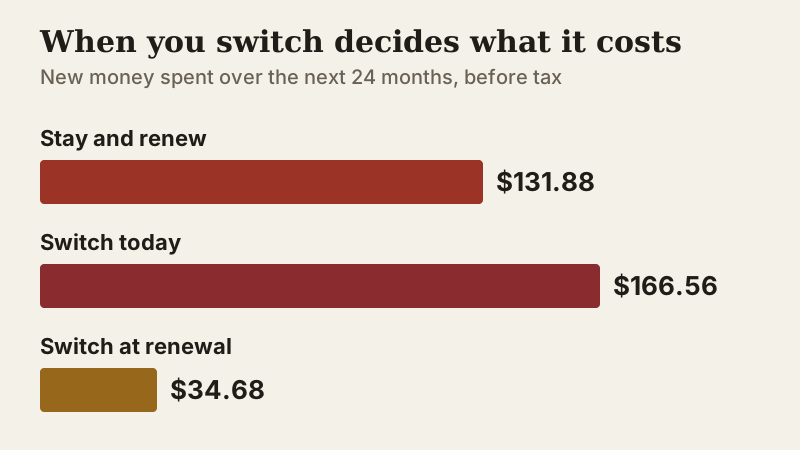
Switching at the renewal date beats staying by $97.20 over two years, and beats switching today by $131.88. The rule generalises: plan the move for the month before your renewal charge, not the month you got annoyed. The exceptions are real problems that cost more than money, such as repeated outages, a hacked account the host will not help with, or support that leaves a store offline. Our checklist of signs of a bad web host separates those from ordinary irritation.
Mind the reset, too. Signing a new intro term restarts the renewal cliff on the new host: the low price ends on that host's schedule, and the comparison you just made comes round again. Note the new renewal date the day you sign up.
Email, SSL and DNS records people forget
The website is the part that gets tested. The breakages that surface a week later are almost always elsewhere.
- Email: if your mailboxes live on the old host, they stop receiving mail the moment the MX record points elsewhere. Move them deliberately, or move mail to a separate provider first so hosting changes never touch it again.
- SPF, DKIM and DMARC: these TXT records tell other servers your mail is genuine. Copy them exactly, or messages from your contact forms start landing in spam.
- SSL: the new host issues its own certificate, usually free, but only after the domain points at it. Expect a short window where the new server answers with a mismatched certificate if you test before the switch; that is normal.
- Subdomains and verification records: a forgotten CNAME for a shop, a booking tool or a Search Console TXT record is a quiet failure that nobody spots until a tool stops working.
- Scheduled jobs: cron tasks are not copied by most migration tools. Recreate them, or your backups, feeds and newsletters stop running.
Export the full DNS zone from the old provider before you change anything. It is a plain text file, and it turns "what did we have?" into a two-minute check.
When not to switch yet
Some moves are worth delaying. If your intro term has more than a few months to run, the arithmetic above usually says wait. If you are in the middle of a launch, a sale or a migration of a different kind, finish that first; a host change is a bad moment to also redesign. And if the problem is speed on a plan that is simply too small, compare an upgrade on your current host before you compare hosts, because the cheapest fix is sometimes one tier up.
On the other hand, do not wait out a renewal on a host that is failing you. A credit for downtime does not cover lost sales, as our explainer on what uptime guarantees really promise shows. When you do pick the next host, rank the shortlist on renewal price and refund terms; our best web hosting rankings put both side by side, and the web hosting comparison lays the plans out in one table.
Edge cases
A few situations change the method:
- Site-builder sites (Wix, Squarespace and similar) cannot be copied as files. Hostinger's free migration explicitly excludes builder sites; expect to rebuild the pages on WordPress or another CMS.
- Very large sites: databases above a few gigabytes are better moved over SSH or with a dump and import than through a browser upload, and some backup tools skip big accounts. Bluehost, for one, skips its own backups once an account passes 50,000 files or 30 GB of data, per its terms.
- Moving to a VPS: free migration offers often stop at shared and cloud plans. Hostinger's does not cover VPS, so plan a manual move or a paid service.
- Ecommerce stores: freeze orders, or at least note the last order number, during the final database copy, so no purchase is lost between the old and new database.
- Moving between registrars at the same time: do the hosting move first, confirm it works, then transfer the domain separately.
Switching hosts: common questions
Can I change web hosting and keep my domain name?
How long does it take to transfer web hosting?
Will my website go down when I switch hosts?
Is web hosting migration free?
When is the best time to switch web hosts?
See how this fits the field: the best web hosting, ranked, or the side-by-side hosting comparison.